
What is PasteGuard and why is everyone talking about it?
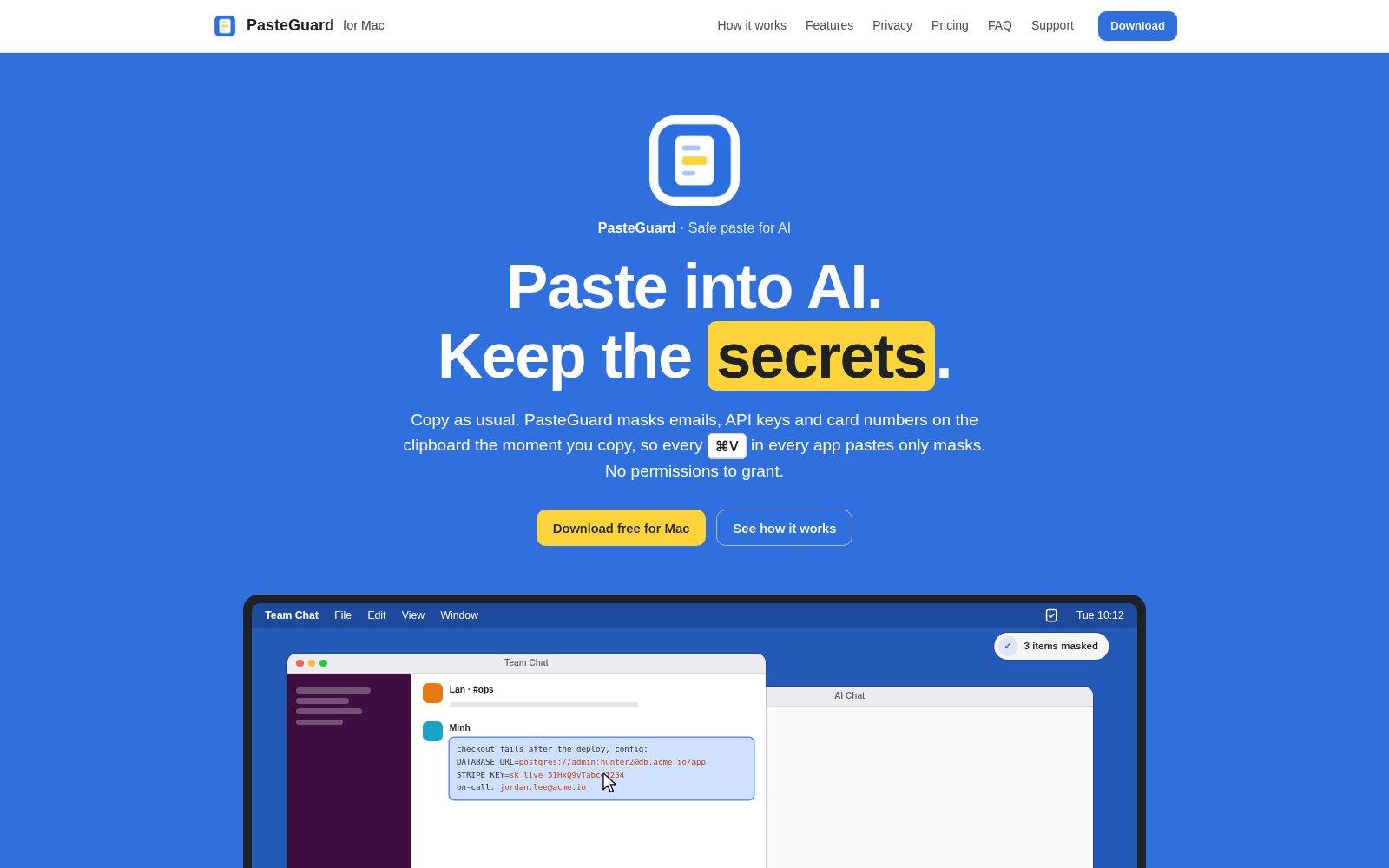
On 4 November 2026 PasteGuard for Mac launched on Product Hunt, the site where new digital products are voted on every day. The idea is simple. When you copy text, the app checks it for private data and swaps that data for a placeholder before you paste it anywhere.
An API key is a kind of password that connects one program to a service, for example your accounting software to your payment provider. Whoever holds it can use that service in your name. It is easy to copy one along with an error message and paste the lot into an AI chat to ask for help. PasteGuard is built for that moment.
According to its official site it recognises 26 types of data in 6 groups, including keys, passwords, emails, phone numbers, cards and bank accounts. Everything runs on the Mac, with no account and nothing sent over the network. When you copy the AI's reply, a shortcut puts the real values back. There is also an optional Apple Intelligence check for data the rules miss, such as names.
What could a business or public office use it for?
The risk is not limited to people who write software. Office staff copy and paste all day, and an AI chat is often the first place they ask for help.
- In accounts, you paste a customer's email into ChatGPT to help draft the reply. The email address, phone number and bank details reach the chat as placeholders.
- In support, you ask Claude to summarise a ticket that includes an error log. Keys and database addresses stay out.
- In a Slack or Teams channel, you share an error with an outside supplier without showing everyone the password to your management software.
What doesn't it do (yet)?
PasteGuard works only on a Mac and protects only what goes through the clipboard. If someone types a password by hand, uploads a whole file to a chat or photographs the screen, the app does nothing. The developer says on Product Hunt that it is not perfect and recommends reviewing sensitive content before sharing it.
There are practical limits too. Another app that keeps clipboard history can save the original value before PasteGuard hides it. The Pro version, with your own rules and lists of customer names, is not on sale yet. The site shows $1.99 a month or $12.99 a year, marked "coming soon".
A similar option is SafetyClip, a Mac clipboard manager that takes copied keys off the clipboard and asks for Touch ID before pasting them. It costs $8 once, according to its Product Hunt page. Here too, protection works one computer at a time.
What about us?
We don't use PasteGuard. In the systems we build, keys never pass through a person's clipboard. As our Security page says, secrets are kept out of prompts and logs, and each agent can reach only the modules it needs, with permissions you can revoke.
How would we use it? As a safety net on the Macs of people who use AI chats a lot, next to two written rules. Keys live in a password manager. And a key that ends up in a chat counts as exposed and gets changed straight away.
Try it or wait?
- If your team uses Macs and AI chats every day, try the free version on a couple of machines and check what it hides by mistake.
- If you use Windows or work across several devices, PasteGuard won't help. Start with a written rule and a shared password manager.
- If a key has already landed in a chat or a ticket, don't wait for any app. Change it from the service's control panel and check who has used it.
“A clipboard app saves you from a careless paste. A key that can do damage still has to be changed the moment it leaves its place.”
DBrothers — how we handle keys in agents
Frequently asked questions
Is PasteGuard free?
Yes. The free version has every feature except your own rules and importing lists from CSV files, which will come with Pro. Pro is not on sale yet.
Does what I copy leave my Mac?
According to the site, no. Detection, masking and the Apple Intelligence check run on the computer, and the app makes no network requests of its own. Original values stay in an encrypted store on the Mac for an hour, a day or a week.
Is an app like this enough to protect a company?
No. It helps one person. A company also needs rules on what may be pasted into AI chats, tools that check outgoing data across the whole network (known as DLP), and a quick way to change exposed keys.
Try listing where the keys to your services live today: a password manager, an email, a ticket, a chat. If there is more than one answer, that's where we start.